


Aloha Browser - Private VPN
4.85.43K Reviews
App Specs
- Version
- 8.9.0
- Updated On
- License
- Free
- Downloads
- 10,000,000+
- Developer
- Aloha Mobile
- Categories
- Productivity
- Platform
- Android, iOS
Screenshots
 Analysis by AppCompare
When I want a browser for a quick search, a private errand, or a page I’d rather not leave open in my usual browsing routine, I value convenience as much as privacy. Aloha Browser - Private VPN brings browsing tools and privacy-oriented features together in one app, rather than asking me to assemble a separate browser and extra utilities. That makes it appealing for everyday use, though the right expectations matter: a browser with built-in privacy features is not automatically the best choice for every kind of online activity.
What the browsing experience is suited to
Aloha Browser is a free productivity app from Aloha Mobile, and its focus is practical: it gives me a place to browse while offering tools intended to make that activity feel more private and less cluttered. It has a 4.6 average from around 334,000 ratings, and it has been installed over 10 million times. Those figures suggest a substantial audience, but what matters most is whether its mix of browsing and privacy tools fits your habits.
I’d consider it for someone who wants a separate browser for searches, reading, or occasional media browsing, especially if ads and intrusive page elements are a regular annoyance. It is less compelling if you rely on a highly customized browser setup, depend on extensions for work, or need fine-grained control over a VPN connection. The distinction is important: convenience is the strongest reason to try it, while specialist control is where a dedicated alternative may suit you better.
For a realistic everyday example, imagine checking a travel detail while waiting for a train, then opening a few related pages without wanting them mixed into your normal browsing routine. Aloha can serve as that separate space. I would still avoid treating it as a magic shield: sensible account security and care with what you share remain necessary, whatever browser you use.
First Impressions and Interface
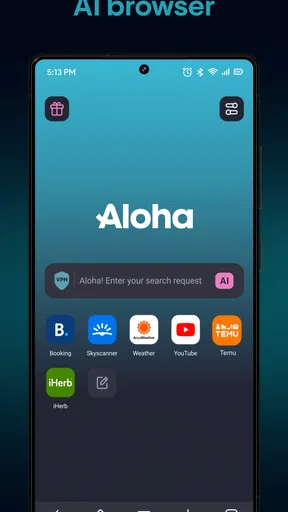
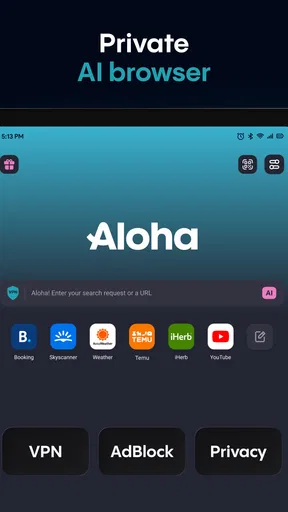
Right off the bat, the Aloha Browser impresses with its sleek and intuitive user interface. It doesn’t bombard you with unnecessary clutter, which is a refreshing change if you’ve been dealing with bloated browsers. Everything feels just a tap away, and navigating through its features is a breeze.
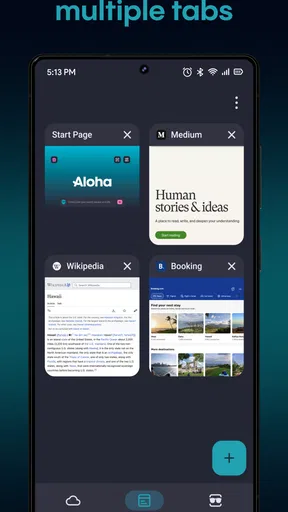
The design is clean and modern. It’s got this minimalist vibe that makes you feel like you’re using something built for the future. The tabs are easy to manage, and switching between them is smooth as butter. No lagging here, folks.
Privacy features and the right expectations
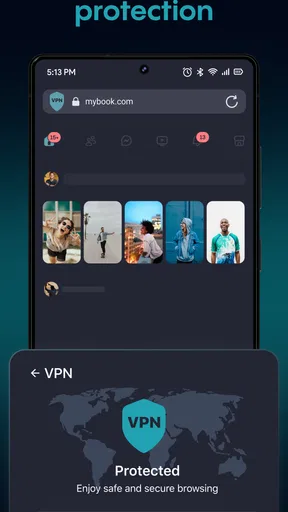
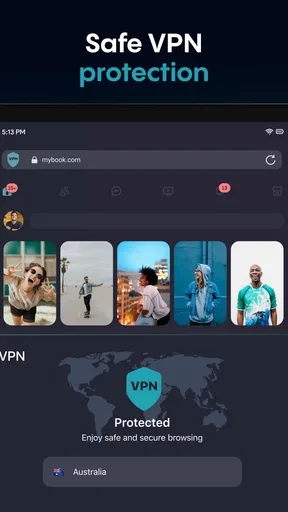
Now, let’s talk about why you’re really here—privacy. Aloha Browser comes with a built-in VPN, and it’s not just a gimmick. This VPN is the real deal, offering you a secure browsing experience. What’s cool is that you don’t need to be a tech wizard to set it up. It’s all integrated, so you can just turn it on and surf away without any worries.
Worth Reading Before You Choose

Flipboard Shows What News Apps Must Do Beyond the Feed

Switching to Android Auto Means Rethinking Your Driving Routine

Google Calendar Makes a Crowded Week Easier to Manage

Ludo King Makes the Most of the Minutes Between Plans

Baby Panda World Brings Quick Play to Modern Phones, but Its Game Library Feels Busy

ESPN’s Live Game View Makes Following Close Games Easier
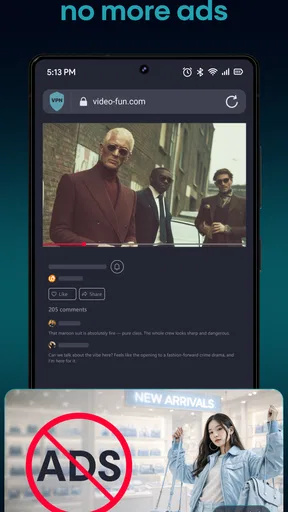
There’s also an ad blocker that actually does its job. I mean, who doesn’t love an ad-free browsing experience? Say goodbye to those annoying pop-ups and hello to seamless browsing.
In practice, the useful trade-off is having privacy-oriented browsing and ad blocking close at hand instead of switching between separate apps. That can make casual browsing simpler, but it does not mean every page will behave identically to a browser without filtering. If a site’s layout or a sign-in flow seems unusual, I’d first try reloading it or temporarily changing how I use the privacy tools before assuming the page itself is broken.
I also wouldn’t choose a browser VPN on the assumption that it replaces every form of network protection. It is most relevant to browser activity; it is not a reason to assume that every app on a device is covered. If your goal is to protect traffic across the whole phone or to select particular server regions and connection settings, a dedicated VPN service with those controls is the more appropriate comparison.
Speed expectations in ordinary browsing
Performance-wise, Aloha Browser holds its own against the big names. I tested it over various networks, and it consistently delivered fast page loads. The integrated VPN doesn’t slow things down, which is often a concern with free VPN services. It’s optimized to ensure your browsing remains swift and efficient.
Speed is still affected by the connection you have, the page you open, and whether privacy tools are active, so I wouldn’t treat one quick session as a promise that every site will load at the same pace. For routine reading and searches, the practical goal is a browser that feels responsive without making me manage a complicated setup. If a page is unusually slow, comparing it with the same page in another browser on the same connection is a more useful check than immediately blaming the VPN.
And if you’re a fan of multimedia, you’ll love the built-in media player. It supports VR, which is a fun addition, especially if you’re into immersive experiences. The player is surprisingly robust, handling different file types without a hitch.
That multimedia angle makes the browser more interesting than a bare-bones privacy tool, but I’d use it selectively. When I’m browsing casually, having playback available in the same app can save a step. For long viewing sessions, a dedicated media app may offer a more familiar routine, and I would check that the content and format I want to play work as expected rather than assuming every file will be supported in every situation.
Busy sessions, downloads, and useful trade-offs
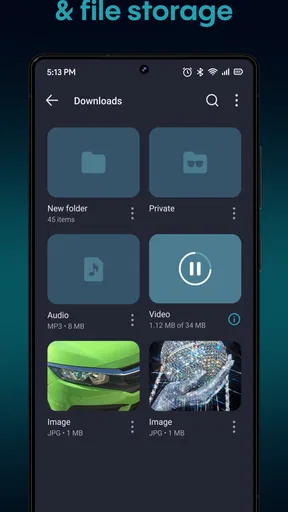
Aside from the privacy and speed, Aloha Browser throws in some nice extras. There’s a download manager that lets you save videos and music directly to your device. It’s like having a mini media library right in your pocket.
A good way to use that feature is to keep a deliberate boundary between browsing and saving: download only what you intend to keep, then review the files when you have time. This is handy when a connection is inconvenient or when you want to return to media later, but downloads also take up device storage. If you use the browser for lots of large files, checking your available space occasionally is a simple habit that prevents a useful tool from becoming a source of clutter.
Heavy sessions are where I’d be more measured about expectations. Several open tabs, media playback, and downloads can all compete for attention on a phone, and how smoothly that feels depends on the device and what else is running. I’d close pages I no longer need and avoid starting multiple large downloads while expecting uninterrupted playback. Those are practical ways to keep a browsing session manageable without assuming the app can overcome every device limitation.
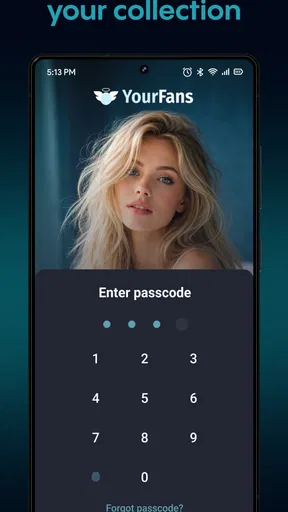
The security features are solid, too. Aloha Browser offers encrypted traffic to keep your data safe from prying eyes. Plus, there’s a fingerprint lock, which adds an extra layer of security—perfect if you’re sharing your device with others.
The fingerprint lock is particularly useful as a local privacy step when someone else may handle your phone; it is different from protecting an online account with a strong password or two-step verification. I’d think of it as one layer in a routine, not a replacement for careful account security. Likewise, encrypted browsing can be valuable, but I still pay attention to whether I’m on a trusted network and avoid entering sensitive details on pages I don’t recognize.
Reliability and day-to-day recovery
For reliability, what I want from a mobile browser is predictable tab handling and a clear way to recover when a page stalls or a connection changes. Aloha’s straightforward interface helps keep the basic browsing flow approachable. If a page stops responding, I’d try reloading it, check whether the network has changed, and reopen the page before abandoning a session. That ordinary troubleshooting matters more than expecting any browser to make every website behave perfectly.
When moving between networks, a page or active media stream may need a moment to reconnect. I’d avoid relying on a browser session as the only place to keep information that matters; save or record important details in an appropriate place instead. This is especially sensible when travelling or switching from Wi-Fi to mobile data, where a brief interruption can happen regardless of which browser is open.
Aloha Browser is available free, with in-app purchases ranging from $0.99 to $99.99 per item. I’d start with the free experience and only consider a purchase if a particular paid option matches a need I actually have. That keeps the decision grounded in how I use the app, rather than paying simply because I’m curious about extra features.
Device fit and alternatives
The app is rated for Everyone and requires Android 10 or later. That makes checking your operating system version a sensible first step before installing it. On an older or heavily loaded phone, I’d keep expectations modest around multitasking and media use; the browser’s feature set does not remove the limits of the device itself. The current version is 7.14.2, so I’d also keep the app updated through the usual app store process for the platform.
Compared with a typical default browser, Aloha’s appeal is that its privacy-oriented tools, ad blocking, and media features sit together in one browsing app. A standard browser may be the easier choice if you want everything tied closely to your existing account, saved browsing habits, or familiar syncing setup. A privacy-focused browser with a broader extension ecosystem may be a better fit if customization is central to your workflow, while a dedicated VPN is better if you need protection and controls beyond browser use.
That comparison is not a verdict that one approach is universally safer or faster. It is a question of what you want to manage. If your priority is a compact, approachable browser for everyday pages and occasional private browsing, Aloha makes a reasonable case. If your work depends on specific extensions, advanced network settings, or one consistent browser across several devices, I’d choose the tool that handles those needs directly rather than trying to make this app do everything.
Room for Improvement
No app is perfect, and Aloha Browser is no exception. While its focus on privacy is commendable, I did notice it lacks some customization options that power users might crave. It would be great to see more themes or extensions to tailor the experience further.
Also, while the VPN is fantastic for most tasks, it might not be robust enough for heavy-duty users who need specific region servers or advanced settings.
Those limitations shape who should skip it. If you enjoy building a browser around a particular set of add-ons, need detailed control over how a VPN connects, or prefer to keep browsing and media management in separate specialist apps, the all-in-one approach may feel restrictive. I’d also choose another option if your main requirement is whole-device VPN coverage rather than privacy features within a browser.
For someone deciding whether to keep using it, I’d test a few normal routines rather than judging it from one page: open the sites you visit most, try the ad-blocking experience on those pages, and see whether the tabs and media tools fit your habits. Then consider whether the privacy controls are convenient enough to use consistently. That short, practical check tells you more than installing a browser and immediately trying to replace every other app on your phone.
Final Thoughts
Overall, the Aloha Browser - Private VPN is a fantastic choice for anyone who values privacy without sacrificing performance. It’s user-friendly, fast, and packed with features that’ll make you wonder how you ever dealt with those other browsers.
If you’re tired of being tracked and want a smoother browsing experience, this app should definitely be on your radar. Download it, give it a spin, and enjoy the peace of mind that comes with knowing your online activities are a little more private.
With its strong focus on privacy and a no-nonsense approach to browsing, Aloha Browser is a solid contender in the world of mobile browsers. It’s not just about being online; it’s about being online safely—without the hassle.
My bottom line is that I’d recommend it to a friend who wants an easy-to-use secondary browser with privacy-minded browsing, ad blocking, and handy media tools in the same place. I’d be more cautious about recommending it as a specialist VPN or a deeply customizable browser, because those needs call for more control than its streamlined approach is designed to provide. If the free version fits your routine, it is an accessible way to see whether this style of browsing works for you.
Pros
- Built-in VPN for enhanced privacy.
- Ad blocker reduces distractions.
- Fast and smooth web browsing.
- Supports VR playback for videos.
- No registration required to use.
Cons
- Limited VPN servers in free version.
- Occasional pop-up for premium upgrade.
- Lacks some advanced browser features.
- Syncing across devices unavailable.
- No dedicated customer support chat.
FAQs for Aloha Browser - Private VPN
What makes Aloha Browser's VPN feature stand out?
Aloha Browser offers a built-in VPN that provides users with enhanced privacy and security by encrypting internet traffic. This feature helps protect your data from hackers and trackers, allowing you to browse anonymously. Unlike other browsers that require separate VPN apps, Aloha integrates this functionality seamlessly, eliminating the need for additional downloads.
Is Aloha Browser suitable for streaming and downloading content?
Yes, Aloha Browser supports high-speed streaming and downloading, making it an excellent choice for media enthusiasts. It includes a built-in media player that supports VR videos, allowing you to watch content without interruptions. The browser also facilitates the downloading of videos directly, so you can enjoy them offline at your convenience.
How does Aloha Browser ensure user privacy?
Aloha Browser prioritizes user privacy by implementing features like a built-in VPN, encrypted connections, and an ad blocker. These tools work together to protect your browsing data from being tracked by third parties. Additionally, the browser does not log any user activity, ensuring that your online actions remain private and secure.
Does Aloha Browser support ad blocking?
Yes, Aloha Browser includes a built-in ad blocker that enhances your browsing experience by removing intrusive ads and pop-ups. This feature not only speeds up page loading times but also reduces data consumption, making your internet usage more efficient. The ad blocker can be easily enabled or disabled in the browser settings.
Is Aloha Browser available for both Android and iOS devices?
Aloha Browser is available on both Android and iOS platforms, ensuring a wide range of compatibility for users. The app is regularly updated to support the latest features and security protocols on both operating systems, providing a consistent and secure browsing experience regardless of your device choice.


